Back to Node List
Screen Position Node
The Screen Position node outputs the screen position of the current pixel. According to the selected Type parameter the position value can be either in Screen Coordinates, [ 0, Screen Width - 1 ] for X axis and [ 0, Screen Height -1 ] for Y axis, or in a normalized [0,1] range for both axis.
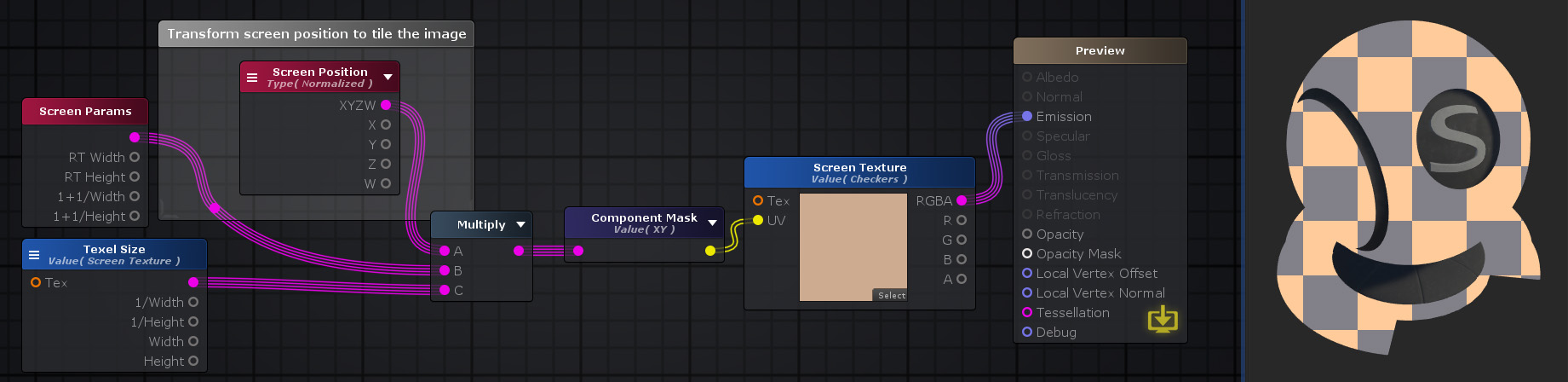
Nodes used:
Screen Position,
Screen Params,
Texel Size,
Multiply,
Component Mask,
Texture Sample
| Node Parameter |
Description |
Default Value
|
| Type
|
Defines how the screen position value should be presented
- Normalized – Gives you the screen position as values normalized by the W component. X and Y end up in the 0–1 range across the screen, and Z and W are also divided by the Raw W value. The bottom-left corner of the screen is (0,0).
- Raw – Previously named Screen. Gives you the unprocessed Screen Position values, before it is normalized by dividing by W. The origin (0,0) is at the bottom-left of the screen.
- Center – Treats the center of the screen as (0,0). Values range from –1 to 1 across the screen, which is useful for effects that radiate from the middle. Z and W are not used.
- Tiled – Similar to Center mode, but the coordinates repeat in a tiled pattern. This is useful for looping or repeating screen-space effects. Z and W are not used.
- Pixel – Gives you the screen position in actual pixel units. The bottom-left corner is (0,0), and the maximum values depend on the screen resolution. Unlike Normalized mode, these values change when the screen size changes. Z and W are not used.
|
Normalized
|
| Output Port |
Description |
Type
|
| XYZW
|
Returns the Screen Position value
|
Float4
|
| X
|
Returns only the X component of the Screen Position
|
Float
|
| Y
|
Returns only the Y component of the Screen Position
|
Float
|
| Z
|
Returns only the Z component of the Screen Position
|
Float
|
| W
|
Returns only the W component of the Screen Position
|
Float
|
Back to Node List